Adoption is a complex and sensitive subject. Different adoptees have different views about how they want to document their ancestry, and many wish to explore both their biological and adoptive family histories.
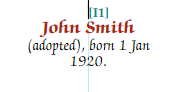
At the simplest level, set the parental linkage to "Adopted" on the Families tab of the Current Person Other Detail dialog. This shows "(adopted)" on charts and in narrative reports:
If more detail is known, add an adoption fact using Facts > Add Person Fact > Adoption. This allows you to record the date and place of adoption and link source citations. The adoption fact also lets you specify which family adopted the child and which member(s) of the couple were the adopting parents.
Note — A child with an adoption fact still needs to be linked to parents in the usual way. The adoption fact records the event but does not create the parent-child linkage itself.
Pedigree Forge allows a person to be linked to two families as a child, supporting both adoptive and biological parents. To add a second set of parents, use Edit > Other Parents while editing the adoptee.
You can switch between the "primary" and "other" parents using Edit > Other Parents > Swap primary and other parents. The primary parents are the set currently shown in the editing panel.
Set the appropriate linkage type for each set — "birth" for the biological parents and "adopted" for the adoptive parents — as described in Parental linkage.
On descendant charts, the adoptee appears under both sets of parents. For ancestor charts (such as birth briefs), the Chart Properties panel has an option in the Miscellaneous section of the Person tab to choose which family line to follow — adopted, birth, or foster.
Report configuration also offers options to follow birth then adopted, adopted then birth, only adopted, or only birth families. See the Reports section for details.