Most descendant charts start with one person at the top. It is possible to start with two (or more) people and have their charts merge where a shared descendant appears.
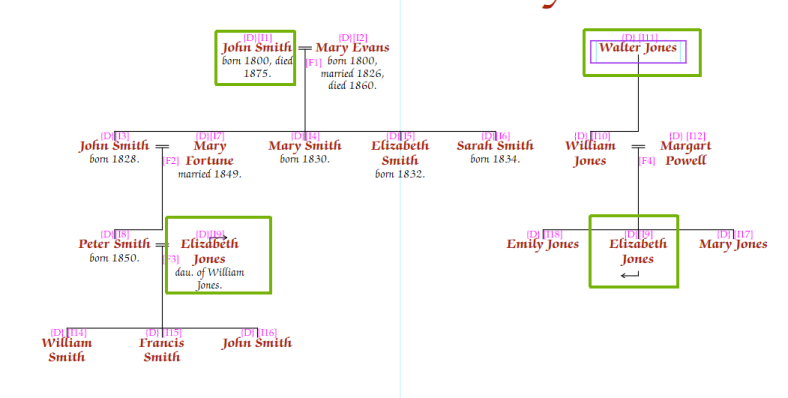
The chart redraws with both starting people. Where someone appears in both lines, they are shown twice with connecting arrows:
In charts created with current versions of the software, duplicates that end up next to each other are merged into a single entry automatically — you do not need to do anything.
For charts created with older versions of the software, merging is manual: select the duplicated person, go to the Person tab, and check Merge with duplicate in the Miscellaneous section. This control is shown only for those older charts, and is kept for compatibility with them:
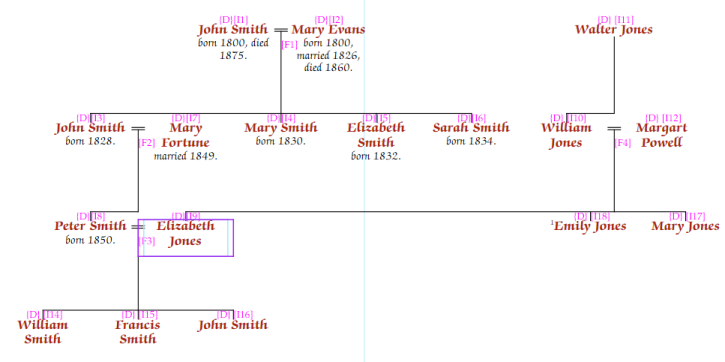
If the two family lines reach the shared person at different generations, use the Offset boxes on the General tab to shift one starting person down by one or more rows.
By default, every additional start person is placed at the top of the chart, alongside the first. Sometimes you instead want their family to appear within the chart — for example, to show where a person who married into your family came from, without leaving descendant mode.
The Insert after box beneath each additional start person controls this:
Where the inserted family shares a person with the rest of the chart — such as the married-in spouse themselves — that person is merged into a single entry automatically, joining the two families at one box.
Leave Insert after empty to keep the start person at the top of the chart.
Note — Insert after is available only on charts created with current versions of the software, and only in descendant charts.
Warning — Merging duplicates works best when the shared person is the first sibling in their family. In other configurations, lines may occasionally cross.