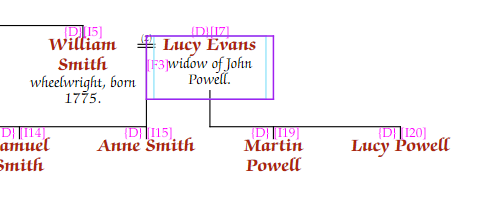
When a spouse has other partners, you can control how much of the step-family is shown on the chart.
Select the person in editing mode, go to the Person tab of the Chart Properties panel, and use the Step Families drop-down:
| Option | Effect |
|---|---|
| Default | Shows spouses and their children |
| Exclude | The step-family is completely hidden |
| Spouses | Shows the other spouses but not their children |
| Spouses & Kids | Same as Default — shows everything |
For a neater presentation, you can fold a step-spouse into the main spouse’s entry as a "widow of" or "remarried to" note. Select the spouse, go to the Person tab, and use the … button next to Fold wid/remarried to choose which family to fold.