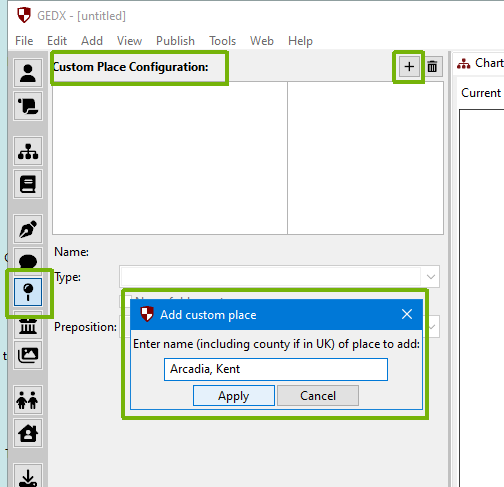
A place can be added to the database via the “Places” panel (select the map-pin icon from the left-hand action bar).
Tip: You can also add an unrecognised place to the database directly from a place field on the person panel with the keyboard shortcut Ctrl + Y (or by selecting this option from the “Edit” menu).
>
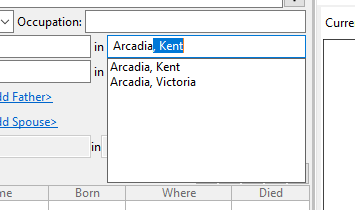
The place will then be considered as verified, appear as suggestions, and not show in red when entered:
Note: A few places can be entered just by themselves. This is usually when there is one specific place that is really well-known. There might be other places with that name, but they would always need clarification. For example, “Paris” alone would imply Paris in France; if you wanted Paris in Yorkshire, you would need to enter “Paris, Yorkshire” This is the way we talk in natural conversation.
There is one occasion when the place only, not the address being shown on a chart doesn’t make so much sense, which is the place of burial. In particular, there are many large London cemeteries, particularly the “Magnificent Seven”. The place in which they are located is perhaps less of interest than the name of the cemetery. When Pedigree Forge can identify this, the place of burial is shown on the chart as the name of the cemetery, rather than the place. For example, “Abney Park Cemetery” is really an address, but is more informative than “Stoke Newington, Middlesex”.