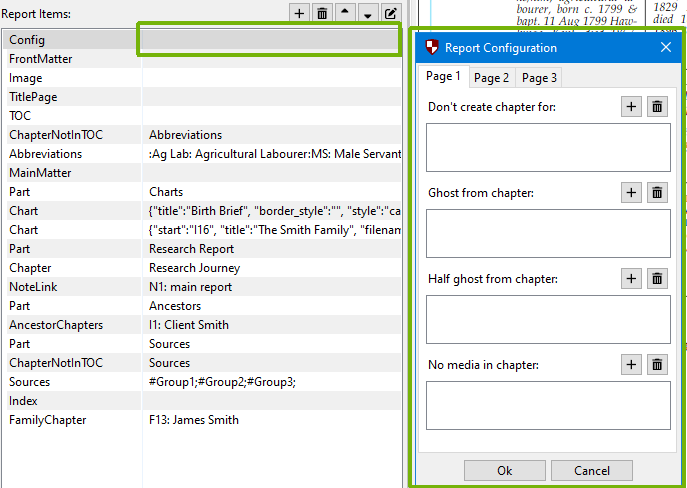
One of the items available in the report items list is the configure report item. This is an advanced feature, but allows changes to be made to how a report is created. The configuration item must be the first item in the list of items for it to have an effect throughout the whole report.
There are various lists on this dialog. Using the “+” and “trash” buttons will allow you to select certain records (generally people), to configure the report.
Don’t create chapter for: don’t generate a chapter for the person(s) in the list and don’t follow them back either.
Ghost from chapter:
In the chapter in which this person would appear with their spouse, create a chapter but ghost this person from it (don’t them in the title or narratives). Useful if there is reason that this person should be virtually ignored.
Half ghost from chapter: In the chapter in which this person would appear with their spouse, create a chapter and include that person in the chapter title, but don’t write a narrative for them. Useful if the person isn’t of interest in the report.
No media in chapter: doesn’t include any media (attached files) for this person or these persons.
Reverse in chapter: f there is a husband and wife, normally an AncestorChapter starts with the husband. Selecting one of the people in a chapter here starts the chapter the other way round. This means the wife is introduced first and appears first in the chapter’s title
Reverse joint marriage: Switch the order in which spouses are introduced in the narrative in the marriage clause paragraph. The chapter headings are left in the default order.
Stop at children: when people are included in child lists, stop at this person, don’t include their own children in the subordinate list.
Local source citations in reference list:When checked, includes local citations (those without a source record) in the references report item, otherwise exclude them.
Use UPPERCASE surnames: It is recommended that surnames are entered in their natural case, usually with a capital letter first. Pedigree Forge leaves names as entered, because sometimes case is relevant, including inside a word, for example “McNelly.” There is an old-fashioned convention of using uppercase for surnames. Checking this box will force surnames to always be upper case.
Custom chapter tiles: Change the default title for a particular person or family’s chapter. Select a person or family, and use the dialog box to set what the chapter title should be.
Which parents for adoptees: When building the ancestors to be included in a report, this sets which family or families, and in what order, the parent families should be followed. Select the person and the family combination.