Charts-Hybrid charts

Pedigree forge allows you to create a hybrid chart, which starts from a particular person and includes their descendants and ancestors: it is a mix between a descendant chart and an ancestor chart. There is also the option to include their siblings too (and their descendants too).

To create a hybrid chart, click on the “New Chart” button on the “Charts” tab, then either select “Hybrid Chart” if you want to start with a particular person, but not include their siblings or “Hybrid With Siblings Chart” if you want to include their siblings too:

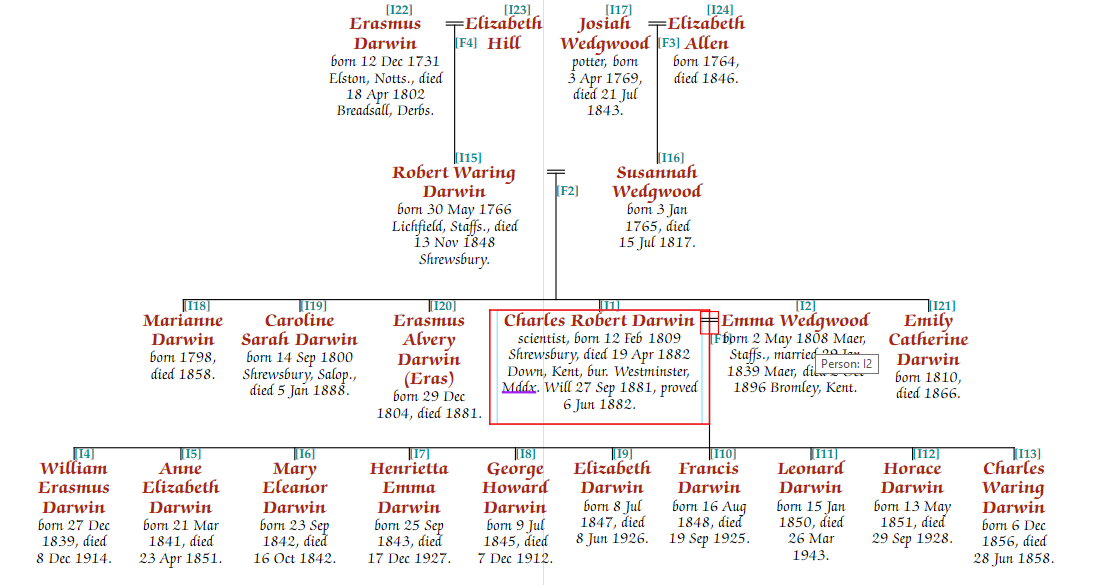
The following is a “Hybrid With Siblings” chart, start with Charles Robert Darwin. It includes his ancestors, and descendants. If further generations were added, the chart would expand.

A Hybrid chart (without siblings) starting with Charles wouldn’t include his siblings (or their descendants if added).

Editing hybrid charts is very similar to the steps outlined for drop line charts, indeed, some of the chart is a drop line pedigree.

A similar effect can be created by specifying multiple start people on drop line pedigree charts, see the section on “Starting charts with multiple people”. The main difference is that the hybrid mode charts don’t include siblings of ancestors of the starting person, which often gives a “cleaner” looking chart, at the expense of some information.

Next >>